Open topic with navigation
(continued from Introduction)
Requirements
The following are system requirements needed to install RM Monitor.
- RM Monitor can only be installed on systems with a valid security key: RM Monitor will work with a dealer demo software key on demo software but not on demo software not utilizing a security key.
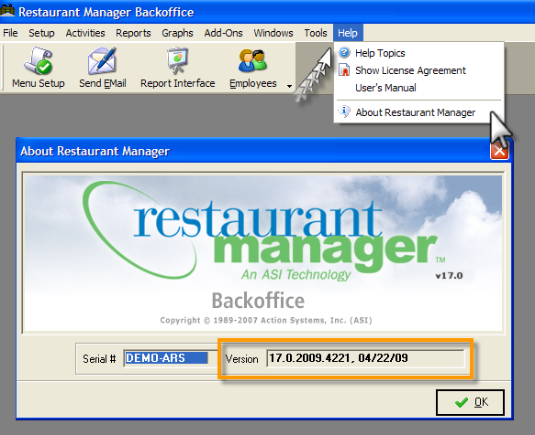
- RM Monitor ver 1.3 is only compatible with Restaurant Manager Version 17 on builds dated 17.0.2009.03110 and later. You can verify you RM build by going into RM BackOffice and clicking on the “Help” option located on the windows menu at the top of the screen and then select the “About Restaurant Manager” option.
- It is also suggested that you use RM Alert.exe dated 3/11/10 or after. RmAlerts must be running at all times and it is suggested you make this executable part of the startup program (rmstart.exe).
- Internet access on all devices. The host computer at restaurant site (i.e. where RMAlert is running) must have unencumbered access to the internet. Important: using internet proxy address settings to restrict internet access will result in RM Monitor failure.
- Enrollment in SMP or purchase of service: Note: new licenses have one year of free service starting on software purchase date.
(continued in RM Monitor Registration)